Conference room LED displays are rapidly becoming the goto solution for modern meeting spaces replacing traditional projectors and LCD video walls due to their superior visual quality seamless design and enhanced functionality
Heres a detailed overview of conference room LED displays
Why Choose an LED Display for Your Conference Room
LED displays offer significant advantages over other display technologies in a conference room setting
Superior Visual Quality
Brightness Contrast LEDs deliver higher brightness and contrast ratios ensuring content is vibrant and clear even in welllit rooms This eliminates the need to dim lights creating a more comfortable meeting environment
Color Accuracy Excellent color reproduction provides rich and realistic visuals crucial for presentations with intricate graphics branding or design elements
High Resolution Fine Pixel Pitch Modern indoor LED displays boast very fine pixel pitches eg P09 P125 P15 P18 P25 This results in incredibly sharp highdefinition images that are clear even from a close viewing distance making text and small details perfectly legible
Seamless Viewing Experience
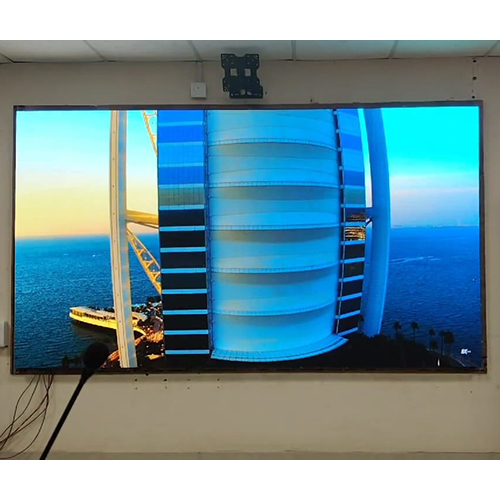
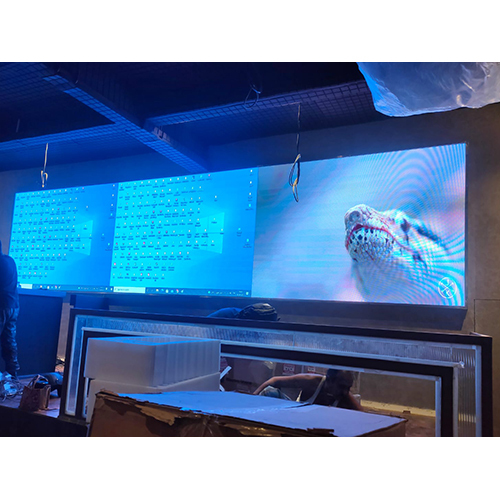
Unlike traditional LCD video walls which have visible bezels frames between screens LED displays are seamless This creates a single expansive canvas for content providing an immersive and professional aesthetic
Flexibility and Customization
LED displays are modular meaning they are built from individual panels This allows for immense flexibility in size and shape enabling custom installations that perfectly fit the conference rooms dimensions and design including curved walls or unique configurations
They can be designed to specific aspect ratios eg 169 219 to match standard content formats
Durability and Longevity
LED displays have a long operational lifespan often rated for 100000 hours or more reducing the need for frequent replacements
They are robust and designed for continuous operation
Enhanced Collaboration and Functionality
Many conference room LED displays now offer interactive touch capabilities transforming them into giant interactive whiteboards for brainstorming annotation and dynamic presentations
Seamless integration with video conferencing platforms Zoom Microsoft Teams Google Meet and wireless presentation systems eg BenQ InstaShow allows for effortless sharing of content from laptops tablets and smartphones
Features like splitscreen display allow multiple participants to share their screens simultaneously
Modern Aesthetic
A sleek bezelfree LED video wall elevates the overall look and feel of a conference room presenting a cuttingedge and professional image
Key Considerations When Choosing a Conference Room LED Display
Pixel Pitch Pvalue
This is the most critical factor for indoor displays Its the distance between the center of one LED cluster pixel and the next A smaller pixel pitch eg P125 P15 P186 P25 means higher pixel density resulting in a clearer sharper image at closer viewing distances
Rule of Thumb The ideal pixel pitch is often estimated as the minimum viewing distance divided by 1 For example if the closest viewer is 2 meters away a P2 or P25 display would be suitable For very close viewing eg 15 meters P15 or even finer pitches are preferred
Display Size and Resolution
Determine the physical size of the wall you need based on the room dimensions and the number of participants
Choose a pixel pitch that allows you to achieve the desired resolution Full HD 4K or even 8K for that size ensuring content clarity A common goal is to achieve native 1920x1080 Full HD or 3840x2160 4K resolution on the LED wall for optimal video and presentation quality
Brightness
While not as high as outdoor displays indoor displays need sufficient brightness typically 8001500 nits to be clearly visible in ambient room lighting without being overpowering
Refresh Rate
A high refresh rate eg 1920Hz 3840Hz or higher ensures smooth video playback and prevents flickering especially important for video conferencing and dynamic content
Viewing Angle
Ensure a wide viewing angle typically 160170 degrees horizontally and vertically so that participants on the sides of the room can still see the content clearly without color shift or brightness degradation
Content Management System CMS Connectivity
A robust and userfriendly CMS allows for easy scheduling uploading and managing of various content formats
Look for multiple input options HDMI DisplayPort USB and wireless casting capabilities for seamless connectivity with laptops and other devices
Integration with popular video conferencing tools is also a significant advantage
Maintenance and Service Access
Consider whether the panels allow for front or rear maintenance which impacts installation and ongoing serviceability
Budget
Fine pixel pitch LED displays represent a significant investment Balance your desired resolution and size with your budget


 Send Inquiry



 Send Inquiry


 English
 Spanish
 French
 German
 Italian
 Chinese (Simplified)
 Japanese
 Korean
 Arabic
 Portuguese
